
There are a number of ways you can search the catalogue as noted below.
From the Home Page:
On the home page you will find links to Brewing Related collections, Photographic Collections and Featured Content.
Brewing Related links
Using any of these links will take you to a statement of what is in the collection for that brewing company.
If you click on the “Browse by Hierarchy” button you will be taken to the next level which lists all of the companies represented in the collection. Selecting the company you’re interested in and using the “Browse by Heirarchy” button will take you progressively through the hierarchy until you reach what you are looking for.
Photographic Links
Using the links here will bring back all records in the photographic collection that relate to the subject heading chosen. Using the search box as outlined below you can filter the results as required.
Featured Content Links
Using the links will take you to specific articles that can be found on this web site.
Using the Search Box
You can use the search box found at the top of each page to enter a particular keyword, combination of words or a reference number. This will return search results with the records displayed in order of the most relevant first. The search covers our guidance pages as well as entries on the online catalogue.
Tip – you can search for an exact phrase by using quotation marks, e.g. “Industrial Revolution”.
Tip – you can also use an asterisk for wild card searches e.g. “Davi*son” will find both Davison and Davidson.
Results page
The results page will display basic information about each record and a thumbnail image where available.
Select ‘View Record’ to view the full description, order or view the original record or browse that particular collection.
Tip – You can sort the results list by title, date or level (i.e. collection, series or item – articles or general information pages will be listed at the top). Simply use “Sort By” in the left-hand panel to select the relevant option.
Details
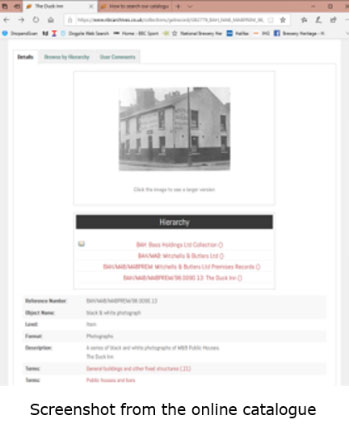
This shows further information about the record. Please note, the Reference number shown is the one we use to physically find the item and which should be quoted in any correspondence or dialogue re the item.
You can also leave a User Comment if you want to supply some relevant information about the item. You can also inform us of any item with errors which we will investigate and where necessary, we’ll make updates as necessary.
A further click on an image will show the full-size image.
Further search options and tips
Once you have your initial search results, you can filter this using the options in the left-hand panel.
For instance, you can filter the results to show only those which include an image. The filter is also particularly useful for formats – for example to find photographs or maps. However, please note that the results will depend on how well the records are indexed. In particular, the subject, people, place and date filters are unlikely to provide comprehensive results.
Tip – to narrow your search to material about a specific name (e.g. pub name) select that name by entering it in the search box.
Tip – to narrow your search to material about a specific location select that location from the Places filter.
Tip – to narrow your search to material about a specific subject select that subject from the Subject filter.
Tip – to narrow your search to material about a specific format (genre) select that format (genre) from the Format filter.
Tip – or if you wish to search material by level of hierarchy select that level from the Level filter.
You can also use the “Advanced” button (at the right of the search bar) to make your initial search more specific as well as restrict the search to exact phrases.
Once you’ve used the search bar you will see on the left of the search screen immediately below your search criteria, four icons titled List, Map, Images and Timeline.
Using the List icon
The list icon is the default format for results display.
Using the Map icon
The map icon will display an interactive map displaying all results with geographic coordinates. Zooming in and out the locations will become more apparent and clicking on a point will reveal details of what is in the location selected.
Using the Images icon
Using this feature will display a collage of small thumbnail images of all images associated with the selected subject matter in your search. Clicking on any one will display a pop-up larger zoomable image with an option to view the details of the record.
Can’t find what you are looking for?
Our online catalogue includes details of a vast range of archive material that is held by The National Brewery Collection. This is part of an ongoing project, so new material is being uploaded all the time.
If you can’t find what you are looking for, please send an email to [email protected]
OR write to us at
The National Brewery Heritage Trust, PO Box 8622, Swadlincote, Derbyshire, DE11 1HY